Total Revenue: $2396.22
High-value sales: 3Functions and Lambda Functions
General and Anonymous Functions in Python
Oliver Bonham-Carter
On For Today
Let’s build from general functions to elegant lambda syntax!
Topics covered in today’s discussion:
- 🐍 What are Functions? - General functions explained
- 🐍 Functions Without Return Values - Quick action-oriented example
- 🐍 Functions That Return Values - Quick value-producing example
- 🐍 What are Lambda Functions? - Anonymous functions explained
- 🐍 Basic Lambda Syntax - The foundation you need
- 🐍 Lambda vs Regular Functions - When to use each
- 🐍 Lambda with Built-in Functions -
map(),filter(),sorted() - 🐍 Real-World Applications - Practical uses in data processing
- 🐍 Best Practices - Writing clean, readable lambda expressions

Get Ready for Functions and Lambda Functions!

What Are Functions in Python?
General Idea
A function is a reusable block of code that performs a specific task.
- It helps you organize code into smaller parts.
- It avoids repeating the same logic over and over.
- You can give it inputs (parameters), and it may produce an output.
Mental model: define once with def, call many times when needed.
Quick Example: Function That Does Not Return a Value
Quick Example: Function That Returns a Value
What Are Lambda Functions?
Definition
Lambda functions are small, anonymous functions that can have any number of arguments but can only have one expression. They’re perfect for short, simple operations!
- Think of them as: Mathematical functions like
f(x) = x² + 1. - They are functions that are simple, direct, and to the point!
Lambda Functions: The Concept
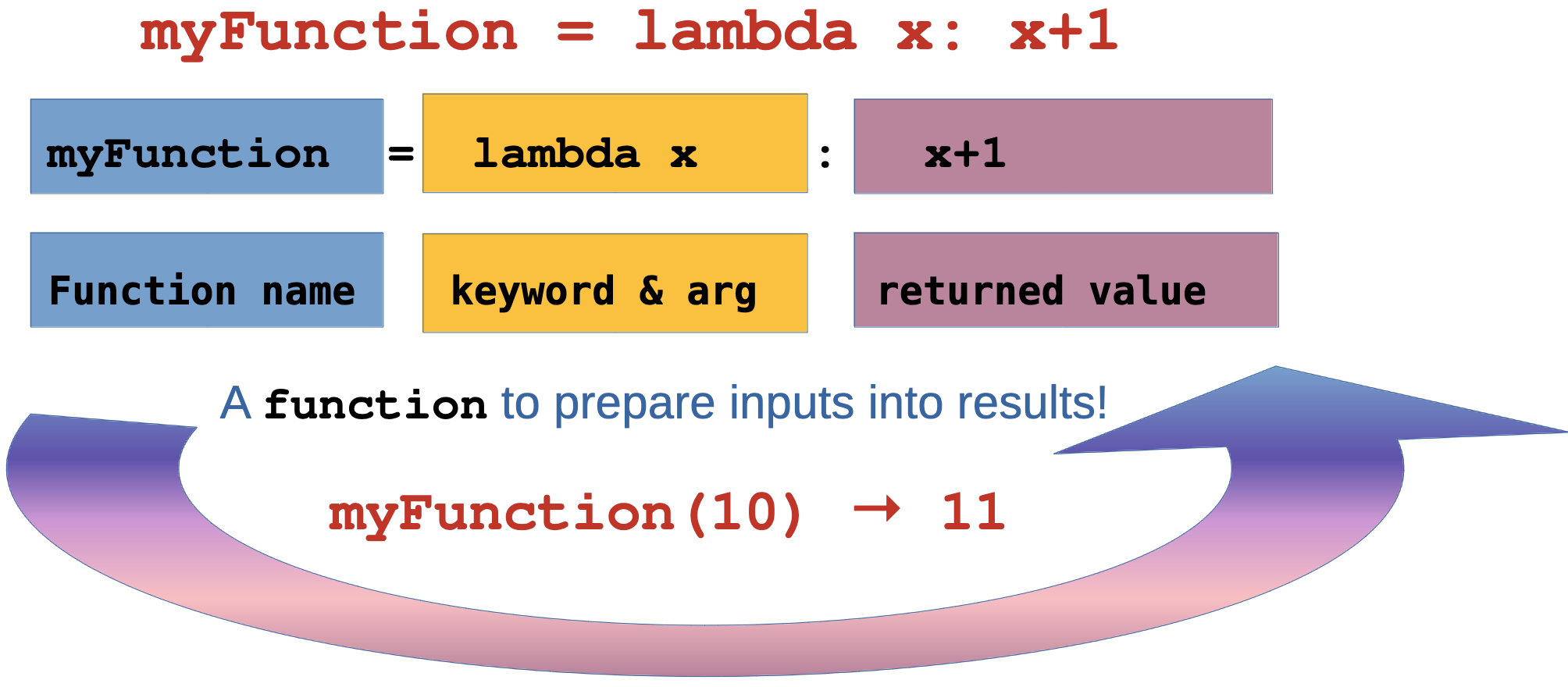
Specifics of Lambda Functions
Important
Limitations:
- Lambda functions are restricted to a single expression.
- They cannot contain statements like assignments, if-else, or for loops within their definition.
- They are primarily used for simple, short operations.
- For more complex logic, a named function is more appropriate;
def myFunction():
Lambda Functions: The Basics
Key Point: Lambda functions are expressions, not statements - they return a value immediately!
Lambda Functions: Multiple Arguments
More Examples
# Multiple arguments
add = lambda x, y: x + y
multiply = lambda x, y, z: x * y * z

# With default arguments
greet = lambda name="World": f"Hello, {name}!"

print(add(3, 5))           # Output: 8
print(multiply(2, 3, 4))   # Output: 24
print(greet())             # Output: Hello, World!
print(greet("Alice"))      # Output: Hello, Alice!
Why this works: Lambda functions can handle multiple parameters just like regular functions!
🤝 Quick Challenge #1 (2 minutes)
Your Turn: Basic Lambda Practice
Challenge: Create lambda functions for these operations:
- A lambda that calculates the area of a circle:
π * r² - A lambda that converts Fahrenheit to Celsius:
(f - 32) * 5/9 - A lambda that finds the maximum
max()of three numbers - A lambda that finds the minimum
min()of three numbers
Starter Code:
import math

# Your lambda functions here
circle_area = lambda r: # Complete this
fahrenheit_to_celsius = lambda f: # Complete this
max_three = lambda a, b, c: # Complete this
min_three = lambda a, b, c: # Complete this

# Test your functions
print(circle_area(5))
print(fahrenheit_to_celsius(68))
print(max_three(10, 20, 15))
print(min_three(10, 20, 15))
Challenge #1 Solutions
Solutions
import math

# Solution 1: Circle area
circle_area = lambda r: math.pi * r * r

# Solution 2: Fahrenheit to Celsius
fahrenheit_to_celsius = lambda f: (f - 32) * 5/9

# Solution 3: Maximum of three numbers
max_three = lambda a, b, c: max(a, max(b, c))
# Alternative: max_three = lambda a, b, c: max(a, b, c)

# Solution 4: Minimum of three numbers (in a list)
myVals = [10, 20, 15]
min_three = lambda thisValue: min(thisValue)
print(myVals)
print(min_three(myVals))

# Test results
print(f"Circle area (r=5): {circle_area(5):.2f}")      # 78.54
print(f"68°F in Celsius: {fahrenheit_to_celsius(68)}")  # 20.0
print(f"Max of 10,20,15: {max_three(10, 20, 15)}")     # 20
print(f"Min of 10,20,15: {min_three(10, 20, 15)}")     # 10
Meet Some Handy Functions! 👋
Essential Built-in Functions
🗺️ map(function, iterable)
Applies a function to every item in a list/iterable
Think: “Transform every item”
🔍 filter(function, iterable)
Keeps only items where function returns True
Think: “Keep only items that pass the test”
📊 sorted(iterable, key=function)
Returns a new sorted list using function for comparison
Think: “Arrange items by custom criteria”
📋 list(iterable)
Converts any iterable (map/filter results) into a list
Think: “Make it a proper list I can print/use”
Simple sorted() Example
sorted() with a Lambda Key
sorted() returns a new list in order. The key function tells Python what value to compare.
A Complicated Example of Lambda with sorted()
Custom Sorting Logic
# Sort with custom criteria
students = [
    {"name": "Alice", "grade": 85},
    {"name": "Bob", "grade": 92},
    {"name": "Charlie", "grade": 78},
    {"name": "Diana", "grade": 96}
]

words = ["banana", "pie", "Washington", "book"]

# Sort students by grade (descending)
by_grade = sorted(students, key=lambda student: student["grade"], reverse=True)
print("Top student:", by_grade[0]["name"])  # Diana

# Sort words by length
by_length = sorted(words, key=lambda word: len(word))
print(f"By length: {by_length}")  # ['pie', 'book', 'banana', 'Washington']

# Sort words by last letter
by_last_letter = sorted(words, key=lambda word: word[-1])
print(f"By last letter: {by_last_letter}")  # ['banana', 'pie', 'book', 'Washington']
Simple filter() and List() Example
filter() Keeps What Passes
filter() keeps items where the lambda returns True and list() converts the filter result into a list.
A Complicated Example of Lambda with filter() and list()
Keep Only What You Want
# Filter elements based on condition
numbers = [1, 2, 3, 4, 5, 6, 7, 8, 9, 10]
words = ["apple", "banana", "cherry", "date", "elderberry"]

# Keep only even numbers
evens = list(filter(lambda x: x % 2 == 0, numbers))
print(f"Evens: {evens}")  # [2, 4, 6, 8, 10]

# Keep only long words
long_words = list(filter(lambda word: len(word) > 5, words))
print(f"Long words: {long_words}")  # ['banana', 'cherry', 'elderberry']

# Keep positive numbers
mixed = [-3, -1, 0, 2, 5, -7, 9]
positives = list(filter(lambda x: x > 0, mixed))
print(f"Positives: {positives}")  # [2, 5, 9]
Simple map() Example
map() Transforms Every Item
map() applies the lambda to each item and returns a new sequence.
A Complicated Example of Lambda with map()
Transform All Elements
# Transform all elements in a list
numbers = [1, 2, 3, 4, 5]
names = ["alice", "bob", "charlie"]

# Square all numbers
squared = list(map(lambda x: x**2, numbers))
print(f"Squared: {squared}")  # [1, 4, 9, 16, 25]

# Capitalize all names
capitalized = list(map(lambda name: name.title(), names))
print(f"Capitalized: {capitalized}")  # ['Alice', 'Bob', 'Charlie']

# Multiple lists
nums1 = [1, 2, 3]
nums2 = [4, 5, 6]
sums = list(map(lambda x, y: x + y, nums1, nums2))
print(f"Sums: {sums}")  # [5, 7, 9]
Lambda vs Regular Functions
When to Use Each
Lambda: For simple, one-line operations that you’ll use briefly
Regular Functions: For complex logic, multiple statements, or reusable code
Rule of thumb: If you can’t explain what the function does in one sentence, use a regular function; e.g., def myFunction():
⚖️🤔💡
Lambda vs Regular: Comparison
Side-by-Side Comparison
# ✅ Good use of lambda - simple, clear
numbers = [1, 2, 3, 4, 5]
squared = list(map(lambda x: x**2, numbers))
print(f"squared is {squared}")

# ❌ Bad use of lambda - too complex
complex_lambda = lambda x: x**2 if x > 0 else -x**2 if x < 0 else 0
for x in range(6):
    print(f"complex_lambda, x={x}, value={complex_lambda(x)}")

# ✅ Better as regular function
def process_number(x):
    if x > 0:
        return x**2
    elif x < 0:
        return -x**2
    else:
        return 0
for i in range(10): print(f"processed number[{i}] -> {process_number(i)}")
Remember: Lambda functions should be simple and readable!
Lambda with Built-in Functions
The Power Combination
Lambda functions really shine when used with Python’s built-in functions like map(), filter(), and sorted()!
Why this matters: These combinations let you process data efficiently with minimal code
🔥⚡🎯
🤝 Quick Challenge #2 (3 minutes)
Your Turn: Lambda with Built-ins
Challenge: Use lambda functions with map(), filter(), and sorted():
# Given data
temperatures_f = [32, 68, 86, 104, 212]  # Fahrenheit
prices = [10.99, 23.45, 5.67, 45.00, 12.34]
products = [
    {"name": "laptop", "price": 999.99, "rating": 4.5},
    {"name": "mouse", "price": 25.50, "rating": 4.2},
    {"name": "keyboard", "price": 75.00, "rating": 4.8},
    {"name": "monitor", "price": 299.99, "rating": 4.3}
]

# Your tasks:
# 1. Convert temperatures to Celsius using map()
# 2. Find prices under $20 using filter()
# 3. Sort products by rating (highest first) using sorted()
Challenge #2 Solutions
Solutions
# 1. Convert temperatures to Celsius
celsius = list(map(lambda f: (f - 32) * 5/9, temperatures_f))
print(f"Celsius: {[round(temp, 1) for temp in celsius]}")
# [0.0, 20.0, 30.0, 40.0, 100.0]

# 2. Find prices under $20
cheap_prices = list(filter(lambda price: price < 20, prices))
print(f"Under $20: {cheap_prices}")  # [10.99, 5.67, 12.34]

# 3. Sort products by rating (highest first)
by_rating = sorted(products, key=lambda p: p["rating"], reverse=True)
print("Best rated:", by_rating[0]["name"])  # keyboard
for product in by_rating:
    print(f"{product['name']}: {product['rating']}")
More Helpful Functions! 🎯
Additional Built-in Functions
➕ sum(iterable)
Adds up all numbers in a list/iterable
Think: “Give me the total of all these numbers”
🔍 len(iterable)
Returns the count of items in a collection
Think: “How many items are there?”
🏆 max(iterable, key=function)
Finds the largest item (optionally using key function)
Think: “Which item is the biggest/best?”
🎲 set(iterable)
Creates a collection with only unique items
Think: “Remove all duplicates”
Fun Fact: These functions work great with the results from map() and filter()!
🧮🎪🌟
Simple sum() Example
sum() Adds Values Together
sum() returns the total of numeric items in an iterable.
Simple len() Example
len() Counts Items
len() tells you how many items are in a list, string, or other collection.
Simple max() Example
max() Finds the Largest Item
With key=, max() can choose the “largest” item using custom logic.
Simple set() Example
set() Removes Duplicates
set() creates a collection of unique values.
colors = ["red", "blue", "red", "green", "blue", "yellow"]
unique_colors = set(colors)
print(unique_colors)  # Order may vary, e.g., {'red', 'blue', 'green', 'yellow'}
Note: The order of items in a set may appear differently each time you print it.
Real-World Example 1
Note
Sales Data Processing
# Sales data from a CSV or database
sales_data = [
    {"product": "Laptop", "price": 999.99, "quantity": 2, "discount": 0.1},
    {"product": "Mouse", "price": 25.50, "quantity": 5, "discount": 0.0},
    {"product": "Keyboard", "price": 75.00, "quantity": 3, "discount": 0.05},
    {"product": "Monitor", "price": 299.99, "quantity": 1, "discount": 0.15}
]

# Calculate total revenue with discounts
total_revenue = sum(map(
    lambda sale: sale["price"] * sale["quantity"] * (1 - sale["discount"]),
    sales_data
))
print(f"Total Revenue: ${total_revenue:.2f}")

# Find high-value sales (over $200 after discount)
high_value = list(filter(
    lambda sale: sale["price"] * sale["quantity"] * (1 - sale["discount"]) > 200,
    sales_data
))
print(f"High-value sales: {len(high_value)}")
Output:
Real-World Example 2
Note
Web Development
# User registration data
users = [
    {"email": "alice@email.com", "age": 25, "active": True},
    {"email": "bob@email.com", "age": 17, "active": False},
    {"email": "charlie@email.com", "age": 30, "active": True},
    {"email": "diana@email.com", "age": 16, "active": True}
]

# Get active adult users
active_adults = list(filter(
    lambda user: user["active"] and user["age"] >= 18,
    users
))

# Extract just the email addresses
adult_emails = list(map(lambda user: user["email"], active_adults))
print("Adult user emails:", adult_emails)

# Sort users by age
by_age = sorted(users, key=lambda user: user["age"])
print("Youngest user:", by_age[0]["email"])
Output:
Adult user emails: ['alice@email.com', 'charlie@email.com']
Youngest user: diana@email.com
Real-World Example 3
Note
Analytic Computing
import math

# Experimental data points
data_points = [
    {"x": 1, "y": 2.1, "error": 0.1},
    {"x": 2, "y": 4.2, "error": 0.2},
    {"x": 3, "y": 5.8, "error": 0.15},
    {"x": 4, "y": 8.1, "error": 0.25}
]

# Calculate distances from origin
distances = list(map(
    lambda point: math.sqrt(point["x"]**2 + point["y"]**2),
    data_points
))

# Filter points with low error (high precision)
precise_points = list(filter(
    lambda point: point["error"] < 0.2,
    data_points
))

# Sort by significance (y/error ratio)
by_significance = sorted(
    data_points,
    key=lambda point: point["y"] / point["error"],
    reverse=True
)
print("Most significant point:", by_significance[0])
Output:
Most significant point: {'x': 3, 'y': 5.8, 'error': 0.15}Lambda Best Practices
Writing Clean Lambda Functions
Follow these guidelines to write maintainable and readable lambda expressions.
Remember: Code is read more often than it’s written - prioritize clarity!
📝✨🎯
Lambda Best Practices: Do’s and Don’ts
Guidelines
✅ DO: Use lambdas for simple, single-expression operations
# Simple, clear operations
numbers = [1, 2, 3, 4, 5]
squared = list(map(lambda x: x**2, numbers))
evens = list(filter(lambda x: x % 2 == 0, numbers))

# Short data transformations
users = [{"name": "Alice", "age": 25}]
names = list(map(lambda u: u["name"], users))
❌ DO NOT: Make lambdas too complex or use them for multi-step logic
Lambda Limitations and Alternatives
When Lambda Is not Enough
# ❌ Lambda cannot do multiple statements
# Need regular function for this:
def process_grade(score):
    print(f"Processing score: {score}")  # Side effect
    if score >= 90:
        return "A"
    elif score >= 80:
        return "B"
    else:
        return "C"

# ✅ Lambda for simple conditions
grade_simple = lambda score: "Pass" if score >= 60 else "Fail"

# ❌ Lambda cannot include assignments
# Need regular function:
def calculate_with_logging(x):
    result = x**2 + 2*x + 1  # Assignment
    print(f"Calculated: {result}")
    return result
Summary: Lambda Functions Mastery
What You’ve Learned Today
🎯 Core Concepts: * Lambda functions are anonymous, single-expression functions * Perfect for simple operations and data transformations * Excellent with map(), filter(), and sorted()
🛠️ Practical Skills: * Data processing and filtering * Custom sorting logic * Functional programming patterns * Real-world application scenarios
📝 Best Practices: * Keep lambdas simple and readable * Use regular functions for complex logic * Prioritize code clarity over cleverness
Challenges

Challenge 1: Quick Lambda Warmup
Your Turn
Write lambdas for each task.
import math

# 1. Rectangle area
area_rect = lambda w, h: # finish

# 2. Apply a 15% discount
discount_price = lambda price: # finish

# 3. Create initials from first and last name
initials = lambda first, last: # finish

print(area_rect(8, 5))
print(discount_price(40))
print(initials("Ada", "Lovelace"))
Challenge 2: map() + filter() Practice
Challenge 3: Sorting with Lambda
Challenge 4: Chaining Functions
Challenge 5: Mini Data Task
Your Turn
Process the trip data using lambdas.
trips = [
    {"driver": "Asha", "miles": 120, "rate": 0.62},
    {"driver": "Ben", "miles": 45, "rate": 0.62},
    {"driver": "Chen", "miles": 200, "rate": 0.62},
    {"driver": "Dia", "miles": 80, "rate": 0.62}
]

# 1. Compute the payout for each trip (miles * rate)
# 2. Keep only trips with payout >= 60
# 3. Print the driver names for those trips
Challenge Solutions
Challenge 1 Solution
Solution + Why It Works
import math

area_rect = lambda w, h: w * h
discount_price = lambda price: price * 0.85
initials = lambda first, last: f"{first[0]}{last[0]}"

print(area_rect(8, 5))
print(discount_price(40))
print(initials("Ada", "Lovelace"))
How it works: Each lambda is one expression. The discount multiplies by \(1 - 0.15\), and the initials slice the first character from each name.
Challenge 2 Solution
Solution + Why It Works
Challenge 3 Solution
Solution + Why It Works
cities = [
    ("Tokyo", 37400068),
    ("Delhi", 28514000),
    ("Shanghai", 25582000),
    ("Sao Paulo", 21650000)
]

by_pop = sorted(cities, key=lambda c: c[1], reverse=True)
by_name_len = sorted(cities, key=lambda c: len(c[0]))

print(by_pop)
print(by_name_len)
How it works: The key function picks the sort value: population at index 1 or the length of the name at index 0.
Challenge 4 Solution
Solution + Why It Works
words = ["apple", "kiwi", "orange", "fig", "grape", "apricot"]

long_words = list(filter(lambda w: len(w) >= 5, words))
upper_words = list(map(lambda w: w.upper(), long_words))
sorted_words = sorted(upper_words, key=lambda w: len(w))

print(sorted_words)
How it works: filter() trims the list, map() transforms each item, and sorted() orders by length using a lambda key.
Challenge 5 Solution
Solution + Why It Works
trips = [
    {"driver": "Asha", "miles": 120, "rate": 0.62},
    {"driver": "Ben", "miles": 45, "rate": 0.62},
    {"driver": "Chen", "miles": 200, "rate": 0.62},
    {"driver": "Dia", "miles": 80, "rate": 0.62}
]

payouts = list(map(lambda t: {**t, "payout": t["miles"] * t["rate"]}, trips))
high_payouts = list(filter(lambda t: t["payout"] >= 60, payouts))
drivers = list(map(lambda t: t["driver"], high_payouts))

print(drivers)
How it works: First add a computed field, then filter by it, then map to just the names.
Congrats!

🎉 Congratulations! You’ve mastered Python’s lambda functions! 🚀🐍✨