Chapter 2: Data Structures
Lists, Dictionaries, Comprehensions, and Sets
Welcome to Python Data Structures!
Tip
Master these powerful tools to organize and manipulate data efficiently!

Why Data Structures Matter
Data structures are containers that help you organize, store, and access your data in different ways.
Note
Think of them as: - Lists: Like a shopping list - ordered items you can modify - Dictionaries: Like a phone book - pairs of names and numbers - Sets: Like a unique collection - no duplicates allowed!

Lists
What are Lists?
Lists are ordered, mutable collections that can hold items of any type.
Note
Key Features: - Ordered: Items maintain their position - Mutable: You can change, add, or remove items - Can contain duplicates - Use square brackets []
Creating and Accessing Lists
"""
This example shows how to create and access lists.
"""

# Creating lists
fruits = ["apple", "banana", "cherry"]
numbers = [1, 2, 3, 4, 5]
mixed = [1, "hello", 3.14, True]
empty = []

# Accessing elements (zero-indexed!)
print(fruits[0])      # Output: apple
print(fruits[-1])     # Output: cherry (last item)
print(numbers[1:4])   # Output: [2, 3, 4] (slicing)
This code demonstrates creating different types of lists and accessing their elements.
Modifying Lists
"""
This example shows how to modify lists.
"""

colors = ["red", "green", "blue"]

# Adding items
colors.append("yellow")           # Add to end
colors.insert(1, "orange")        # Insert at index 1

# Removing items
colors.remove("green")            # Remove by value
last_color = colors.pop()         # Remove and return last item

# Changing items
colors[0] = "purple"

print(colors)
# Output: ['purple', 'orange', 'blue']
Lists are flexible - you can add, remove, and change items easily!
List Operations
"""
This example shows common list operations.
"""

nums = [3, 1, 4, 1, 5, 9, 2]

# Useful operations
print(len(nums))          # Output: 7 (length)
print(max(nums))          # Output: 9 (maximum)
print(min(nums))          # Output: 1 (minimum)
print(nums.count(1))      # Output: 2 (count occurrences)

# Sorting
nums.sort()               # Sort in place
print(nums)               # Output: [1, 1, 2, 3, 4, 5, 9]

# Reversing
nums.reverse()
print(nums)               # Output: [9, 5, 4, 3, 2, 1, 1]
These operations make lists powerful for data manipulation!
Dictionaries
What are Dictionaries?
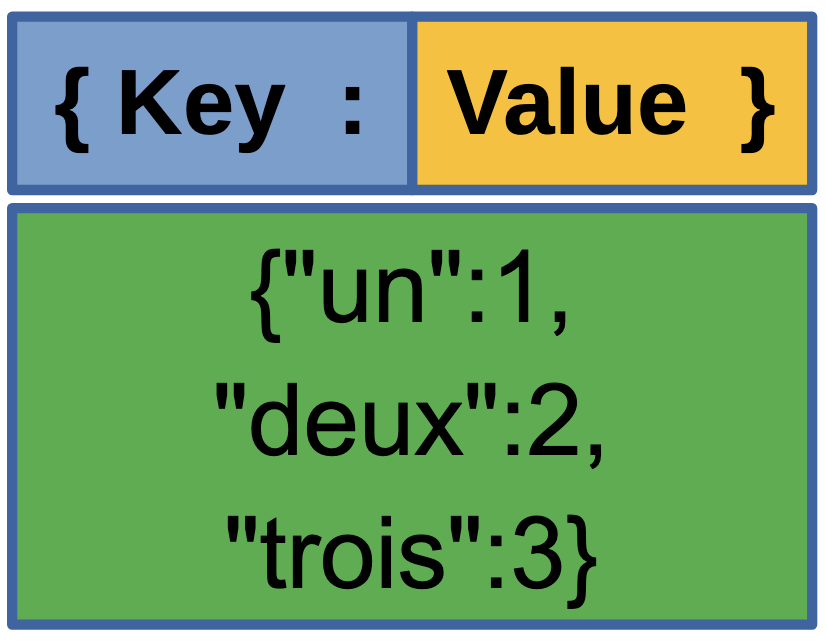
Dictionaries store data as key-value pairs, like a real dictionary stores words and definitions.
Note
Key Features: - Unordered: Items don’t have a fixed position (pre-Python 3.7) - Keys must be unique and immutable (strings, numbers, tuples) - Values can be any type - Use curly braces {}
Creating and Accessing Dictionaries
"""
This example shows how to create and access dictionaries.
"""

# Creating dictionaries
student = {
    "name": "Alice",
    "age": 20,
    "major": "Computer Science"
}

# Accessing values
print(student["name"])           # Output: Alice
print(student.get("age"))        # Output: 20
print(student.get("gpa", 0.0))   # Output: 0.0 (default if key missing)

# Getting all keys and values
print(student.keys())            # Output: dict_keys(['name', 'age', 'major'])
print(student.values())          # Output: dict_values(['Alice', 20, 'Computer Science'])
Dictionaries let you look up values quickly using keys!
Modifying Dictionaries
"""
This example shows how to modify dictionaries.
"""

inventory = {"apples": 5, "bananas": 3}

# Adding or updating items
inventory["oranges"] = 7          # Add new key-value pair
inventory["apples"] = 10          # Update existing value

# Removing items
del inventory["bananas"]          # Delete key-value pair
quantity = inventory.pop("oranges")  # Remove and return value

# Checking if key exists
if "apples" in inventory:
    print(f"We have {inventory['apples']} apples")
    # Output: We have 10 apples

print(inventory)
# Output: {'apples': 10}
Dictionaries make it easy to manage related data!
Iterating Through Dictionaries
"""
This example shows how to iterate through dictionaries.
"""

grades = {"Alice": 95, "Bob": 87, "Charlie": 92}

# Iterate through keys
for name in grades:
    print(name)

# Iterate through values
for grade in grades.values():
    print(grade)

# Iterate through key-value pairs
for name, grade in grades.items():
    print(f"{name} scored {grade}")
# Output:
# Alice scored 95
# Bob scored 87
# Charlie scored 92
Dictionaries are perfect for storing related information!
List Comprehensions
What are List Comprehensions?
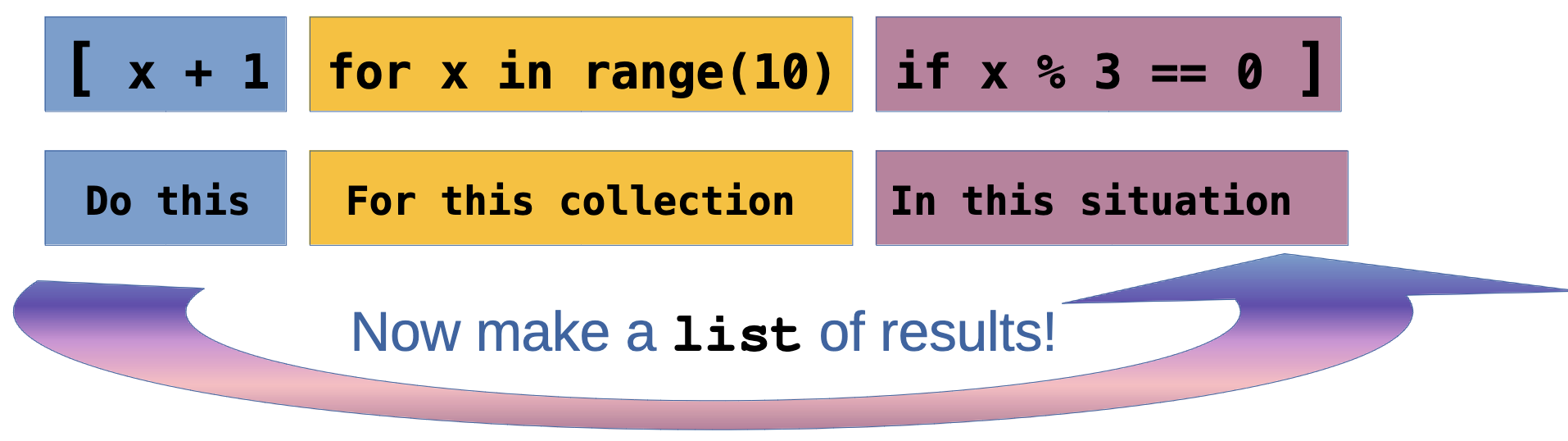
List comprehensions provide a concise way to create lists based on existing lists or ranges.
Basic List Comprehensions
"""
This example shows basic list comprehensions.
"""

# Traditional way: create squares
squares_old = []
for x in range(1, 6):
    squares_old.append(x ** 2)

# List comprehension way
squares_new = [x ** 2 for x in range(1, 6)]

print(squares_new)
# Output: [1, 4, 9, 16, 25]

# Even simpler examples
evens = [x for x in range(10) if x % 2 == 0]
print(evens)
# Output: [0, 2, 4, 6, 8]

upper_words = [word.upper() for word in ["hello", "world"]]
print(upper_words)
# Output: ['HELLO', 'WORLD']
List comprehensions make your code cleaner and more Pythonic!
Advanced List Comprehensions
"""
This example shows more complex list comprehensions.
"""

# Nested list comprehension
matrix = [[i * j for j in range(1, 4)] for i in range(1, 4)]
print(matrix)
# Output: [[1, 2, 3], [2, 4, 6], [3, 6, 9]]

# With multiple conditions
nums = [x for x in range(20) if x % 2 == 0 if x % 3 == 0]
print(nums)
# Output: [0, 6, 12, 18]
List comprehensions can handle complex transformations elegantly!
Advanced List Comprehensions (Continued)
# Using if-else in comprehension
labels = ["even" if x % 2 == 0 else "odd" for x in range(5)]
print(labels)
# Output: ['even', 'odd', 'even', 'odd', 'even']

# Flattening a list
nested = [[1, 2], [3, 4], [5, 6]]
flat = [item for sublist in nested for item in sublist]
print(flat)
# Output: [1, 2, 3, 4, 5, 6]
List comprehensions also help to make code more clean.
Dictionary Comprehensions
What are Dictionary Comprehensions?
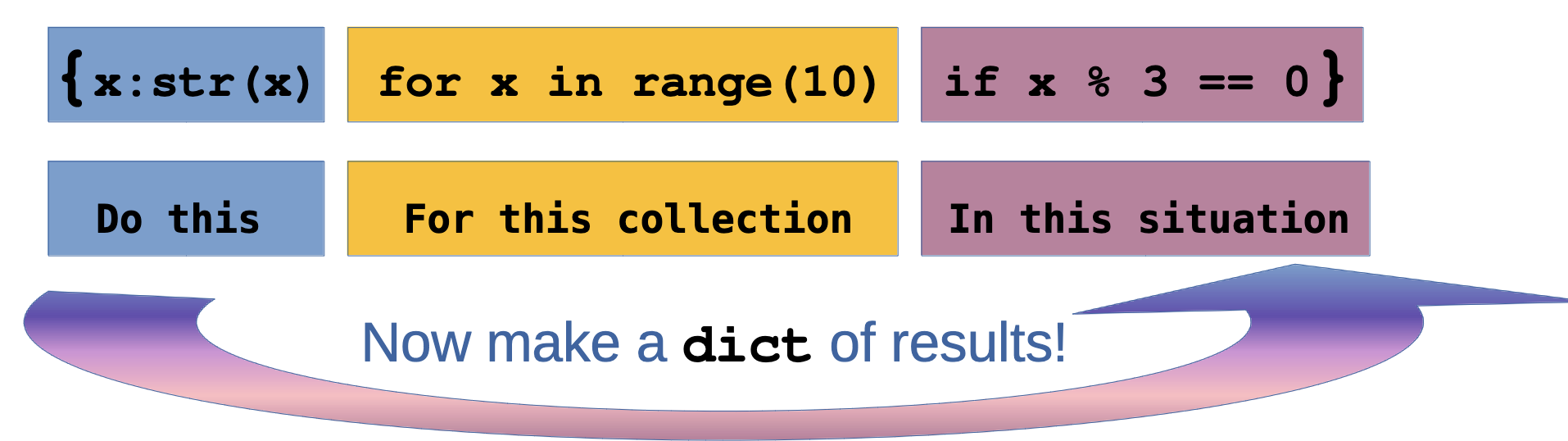
Dictionary comprehensions create dictionaries in a concise, readable way.
Dictionary Comprehension Examples
"""
This example shows dictionary comprehensions.
"""

# Create a dictionary from a list
numbers = [1, 2, 3, 4, 5]
squares_dict = {x: x ** 2 for x in numbers}
print(squares_dict)
# Output: {1: 1, 2: 4, 3: 9, 4: 16, 5: 25}

# With condition
evens_dict = {x: x ** 2 for x in numbers if x % 2 == 0}
print(evens_dict)
# Output: {2: 4, 4: 16}

# Swap keys and values
original = {"a": 1, "b": 2, "c": 3}
swapped = {value: key for key, value in original.items()}
print(swapped)
# Output: {1: 'a', 2: 'b', 3: 'c'}

# Transform values
prices = {"apple": 0.5, "banana": 0.3, "orange": 0.7}
dollars = {item: price * 100 for item, price in prices.items()}
print(dollars)
# Output: {'apple': 50.0, 'banana': 30.0, 'orange': 70.0}
Dictionary comprehensions make creating and transforming dictionaries easy!
Sets
What are Sets?
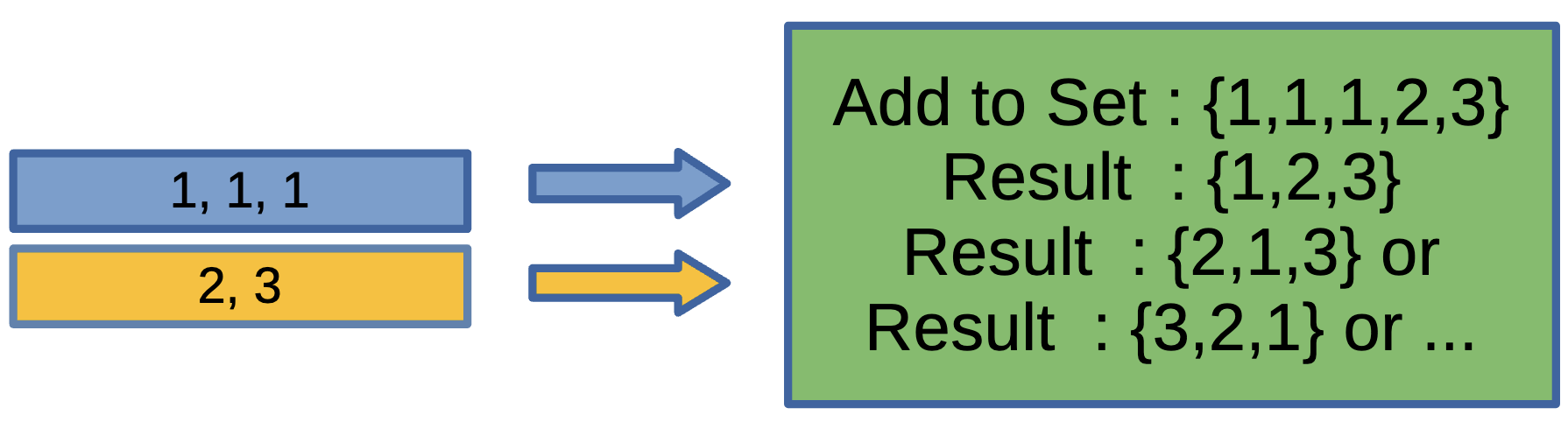
Sets are unordered collections of unique elements.
Note
Key Features: - Unordered: No indexing or slicing - Unique: Automatically removes duplicates - Fast membership testing - Use curly braces {} or set()
Creating and Using Sets
Sets are perfect when you need unique values!
Creating and Using Sets (Continued)
# Adding and removing
fruits.add("orange")
fruits.remove("banana")  # Error if not found
fruits.discard("grape")  # No error if not found
print(fruits)
# Output: {'apple', 'cherry', 'orange'}

# Membership testing (very fast!)
print("apple" in fruits)       # Output: True
print("banana" in fruits)      # Output: False

# Length
print(len(fruits))             # Output: 3
Sets can be configured in many ways except for their order.
Set Operations
"""
This example shows mathematical set operations.
"""

set_a = {1, 2, 3, 4, 5}
set_b = {4, 5, 6, 7, 8}

# Union (all elements from both sets)
union = set_a | set_b
print(union)
# Output: {1, 2, 3, 4, 5, 6, 7, 8}

# Intersection (elements in both sets)
intersection = set_a & set_b
print(intersection)
# Output: {4, 5}
Set Operations (Continued)
Sets support powerful mathematical operations!
Set Comprehensions
"""
This example shows set comprehensions.
"""

# Create a set using comprehension
squares_set = {x ** 2 for x in range(10)}
print(squares_set)
# Output: {0, 1, 4, 9, 16, 25, 36, 49, 64, 81}

# With condition
even_squares = {x ** 2 for x in range(10) if x % 2 == 0}
print(even_squares)
# Output: {0, 4, 16, 36, 64}
Set comprehensions are great for removing duplicates!
Set Comprehensions (Continued)
# Remove duplicates from a list
words = ["apple", "banana", "apple", "cherry", "banana"]
unique_words = {word for word in words}
print(unique_words)
# Output: {'apple', 'banana', 'cherry'}

# Characters in a string (unique)
text = "hello world"
unique_chars = {char for char in text if char != ' '}
print(unique_chars)
# Output: {'h', 'e', 'l', 'o', 'w', 'r', 'd'}
Set comprehensions are all about “Unique” values!
Python Challenge Exercises
Time to practice your data structure skills!

Challenge 1: List Manipulation
Create a list of numbers from 1 to 10. Write code that: 1. Adds the number 11 to the end 2. Removes the number 5 3. Prints the sum of all numbers 4. Prints the list in reverse order
Tip
Hint: Use append(), remove(), sum(), and slicing or reverse()
Challenge 2: Student Dictionary
Create a dictionary with student information (name, age, grade, major). Write code that: 1. Adds a new field “gpa” with value 3.8 2. Updates the age to be 1 year older 3. Prints each key-value pair in a formatted way 4. Checks if “email” exists in the dictionary
Tip
Hint: Use dictionary methods like in, .items(), and bracket notation
Challenge 3: List Comprehension Magic
Using list comprehensions, create: 1. A list of numbers from 1 to 20 that are divisible by 3 2. A list of the first letters of words in: ["Python", "Java", "Ruby", "Go"] 3. A list of tuples containing numbers 1-5 and their cubes: [(1, 1), (2, 8), ...]
Tip
Hint: Use [expression for item in iterable if condition] format
Challenge 4: Dictionary Comprehension Power
Create a dictionary comprehension that: 1. Takes the list ["red", "green", "blue", "yellow"] and creates a dictionary where keys are the colors and values are their lengths 2. From a dictionary of temperatures in Celsius {"morning": 20, "afternoon": 25, "evening": 18}, create a new dictionary with temperatures in Fahrenheit (F = C * 9/5 + 32)
Tip
Hint: Use {key: value for item in iterable} format
Challenge 5: Set Operations Challenge
Given two lists of student names: - class_a = ["Alice", "Bob", "Charlie", "David", "Eve"] - class_b = ["Charlie", "David", "Frank", "Grace"]
Write code that uses sets to find: 1. Students in both classes (intersection) 2. Students in only class A (difference) 3. All unique students (union) 4. Students in exactly one class (symmetric difference)
Tip
Hint: Convert lists to sets, then use &, -, |, ^ operators
Solutions to Challenge Exercises
Let’s review the solutions!
Solution 1: List Manipulation
"""
Solution for list manipulation challenge.
"""

# Create list of numbers 1-10
numbers = list(range(1, 11))

# 1. Add 11 to the end
numbers.append(11)

# 2. Remove the number 5
numbers.remove(5)

# 3. Print sum of all numbers
print(f"Sum: {sum(numbers)}")
# Output: Sum: 61

# 4. Print list in reverse
print(f"Reversed: {numbers[::-1]}")
# Or: numbers.reverse(); print(numbers)
# Output: Reversed: [11, 10, 9, 8, 7, 6, 4, 3, 2, 1]
This solution shows various list operations working together!
Solution 2: Student Dictionary
"""
Solution for student dictionary challenge.
"""

# Create student dictionary
student = {
    "name": "Alice", "age": 20,  "grade": "Junior", "major": "Computer Science"
}

student["gpa"] = 3.8 # 1. Add gpa field

student["age"] += 1 # 2. Update age

for key, value in student.items(): # 3. Print each key-value pair formatted
    print(f"{key.capitalize()}: {value}")
# Output:
# Name: Alice,
# Age: 21,  Grade: Junior, Major: Computer Science, Gpa: 3.8

# 4. Check if email exists
if "email" in student:
    print("Email found!")
else:
    print("Email not found!")
# Output: Email not found!
Dictionaries make it easy to manage structured data!
Solution 3: List Comprehension Magic
"""
Solution for list comprehension challenge.
"""

# 1. Numbers 1-20 divisible by 3
divisible_by_3 = [x for x in range(1, 21) if x % 3 == 0]
print(divisible_by_3)
# Output: [3, 6, 9, 12, 15, 18]

# 2. First letters of words
words = ["Python", "Java", "Ruby", "Go"]
first_letters = [word[0] for word in words]
print(first_letters)
# Output: ['P', 'J', 'R', 'G']

# 3. Numbers 1-5 and their cubes
cubes = [(x, x ** 3) for x in range(1, 6)]
print(cubes)
# Output: [(1, 1), (2, 8), (3, 27), (4, 64), (5, 125)]
List comprehensions make code concise and readable!
Solution 4: Dictionary Comprehension Power
"""
Solution for dictionary comprehension challenge.
"""

# 1. Colors and their lengths
colors = ["red", "green", "blue", "yellow"]
color_lengths = {color: len(color) for color in colors}
print(color_lengths)
# Output: {'red': 3, 'green': 5, 'blue': 4, 'yellow': 6}

# 2. Celsius to Fahrenheit
celsius = {"morning": 20, "afternoon": 25, "evening": 18}
fahrenheit = {time: temp * 9/5 + 32 for time, temp in celsius.items()}
print(fahrenheit)
# Output: {'morning': 68.0, 'afternoon': 77.0, 'evening': 64.4}
Dictionary comprehensions transform data elegantly!
Solution 5: Set Operations Challenge
"""
Solution for set operations challenge.
"""

class_a = ["Alice", "Bob", "Charlie", "David", "Eve"]
class_b = ["Charlie", "David", "Frank", "Grace"]

# Convert to sets
set_a = set(class_a)
set_b = set(class_b)

# 1. Students in both classes (intersection)
both_classes = set_a & set_b
print(f"In both: {both_classes}")
# Output: In both: {'Charlie', 'David'}

# 2. Students in only class A (difference)
only_a = set_a - set_b
print(f"Only in A: {only_a}")
# Output: Only in A: {'Alice', 'Bob', 'Eve'}
Solution 5: Set Operations Challenge (Continued)
# 3. All unique students (union)
all_students = set_a | set_b
print(f"All students: {all_students}")
# Output: All students: {'Alice', 'Bob', 'Charlie', 'David', 'Eve', 'Frank', 'Grace'}

# 4. Students in exactly one class (symmetric difference)
one_class_only = set_a ^ set_b
print(f"Exactly one class: {one_class_only}") #Sets make working with collections of unique items easy!
# Output: Exactly one class: {'Alice', 'Bob', 'Eve', 'Frank', 'Grace'}
Summary
Tip
What We Learned:
- Lists: Ordered, mutable collections - perfect for sequences
- Dictionaries: Key-value pairs - perfect for structured data
- List Comprehensions: Concise list creation - clean and Pythonic
- Dictionary Comprehensions: Concise dictionary creation - elegant transformations
- Sets: Unique elements - perfect for membership and set operations
Note
These data structures are fundamental to Python programming. Master them and you’ll write more efficient, elegant code!
Keep Practicing!
If you are interested, try these!
Tip
Next Steps:
- Try combining these data structures
- Explore nested structures (lists of dictionaries, etc.)
- Practice with real-world data
- Time yourself to see which methods are fastest!