Understanding Computational Complexity
A Comprehensive Guide to Algorithm Performance Analysis
On For Today
Let’s explore algorithm complexity!
Topics covered in today’s discussion:
- ⚡ O(1) - Constant Time — Lightning-fast operations that never slow down
- 🔍 O(log n) - Logarithmic Time — Divide and conquer excellence
- 🏥 Heap-Based Structures — Smart priority management
- 💥 O(2^n) - Exponential Time — The recursive explosion
- 🗺️ Travelling Salesman Problem — Real-world optimization challenges
- 📊 Performance Comparison — Understanding when to use each approach

Why Algorithm Complexity Matters
Important
Real-World Impact
Understanding algorithm complexity helps you:
- ⚡ Build Faster Software — Choose the right algorithm for the job
- 💰 Save Money — Efficient code means lower server costs
- 🌍 Scale Applications — Handle millions of users smoothly
- 🔋 Reduce Energy Usage — Green computing through efficiency
- 🎯 Make Smart Trade-offs — Balance speed, memory, and complexity
Note
The Big Idea: Small algorithmic choices can mean the difference between a program that runs in seconds versus one that takes years. Let’s explore how different complexity classes affect real-world performance!
Part 1: O(1) - Constant Time
The Speed Champion ⚡
O(1) means the algorithm takes the same amount of time regardless of input size!
Key Insight: Think of O(1) operations like light switches 💡. Whether you have 1 light or 1000 lights in your house, each switch always takes the same time to flip!
What is O(1) - Constant Time?
The Superpower of Algorithms ⚡
O(1) means the algorithm takes the same amount of time no matter how much data you give it!
Real-World Analogy: * Like a valet parking service - you hand over your ticket and get your car back instantly * Whether there are 10 cars or 10,000 cars in the lot, it takes the same time! * The valet has a direct system to find your exact car
Performance Guarantee 📊
- 10 items → 1 step
- 100 items → 1 step
- 1,000,000 items → 1 step
- Same speed forever!
Key Insight 🔑
The algorithm has a “shortcut” that goes directly to the answer without checking other data!
Magic Question:
“Can I get the answer without looking at most of the data?”
What Makes O(1) So Fast?
The Secret Ingredients 🎯
O(1) algorithms use smart data organization and direct access patterns
Hash Tables (Dictionaries/Sets)
# Python dictionary (hash table) uses a hash function
# to map keys to memory locations for O(1) access
student_grades = {
    "Alice": 95,
    "Bob": 87,
    "Charlie": 92
}

# Hash function calculates EXACTLY where
# "Alice" is stored in memory
# No searching required - direct jump to the value!
grade = student_grades["Alice"]  # O(1)!
How it works:
- Hash function:
"Alice"→ memory location 147 - Go directly to location 147
- Get the value (95)
- Done! No searching needed!
Array Indexing
# Arrays store data in consecutive memory locations
# This allows direct access via index calculation
scores = [95, 87, 92, 78, 85]
#         0   1   2   3   4  (indices)

# Computer calculates memory address using formula:
# Address = base_address + (index × element_size)
# This mathematical calculation is O(1)!
first_score = scores[0]    # O(1) - instant access
third_score = scores[2]    # O(1) - instant access
Mathematical Magic:
- Memory address = Base + (2 × 4 bytes)
- Jump straight to the answer!
- No need to check other elements
Interactive O(1) Dictionary Demo
See O(1) in Action! 🎮
Try looking up different students’ grades. Notice how it’s always instant!
Student Grade Lookup - O(1) Dictionary Access
Mini Challenge: O(1) Operations
Practice O(1) Thinking! 🧑💻
Try these exercises to understand constant time operations:
Challenge 1: Phone Book
# Create your own phone book using a dictionary
# Dictionaries provide O(1) lookup time
phone_book = {}

# Add contacts - each insertion is O(1)
phone_book["Mom"] = "555-0123"
phone_book["Pizza"] = "555-PIZZA"
phone_book["Friend"] = "555-9999"

# Look up numbers instantly - O(1) access
print(phone_book["Mom"])

# YOUR TASK: Add 5 contacts
# and time the lookups!
import time  # Import time module for benchmarking
start = time.time()  # Record start time
# Add your lookups here
result = phone_book["Mom"]  # O(1) lookup
end = time.time()  # Record end time
print(f"Time: {end-start}s")  # Display elapsed time
Challenge 2: Class Enrollment
# Check which classes a student is in using sets
# Sets provide O(1) membership testing ("in" operator)
math_class = {"Alice", "Bob"}
science_class = {"Bob", "Diana"}
history_class = {"Alice", "Eve"}

student = "Alice"  # Student to check
enrolled = []  # List to store enrolled classes

# O(1) membership checking with sets!
# Each "in" check is constant time
if student in math_class:
    enrolled.append("Math")
if student in science_class:
    enrolled.append("Science")
if student in history_class:
    enrolled.append("History")

print(f"{student}: {enrolled}")

# YOUR TASK: Check all students
# Notice how fast it is even with many classes!
Bonus: O(1) Fibonacci with Binet’s Formula!
The Mathematical Shortcut ✨
Believe it or not, you can calculate any Fibonacci number in O(1) time using pure mathematics!
Binet’s Formula
Instead of recursion or iteration, use this closed-form mathematical formula:
\[F(n) = \frac{\varphi^n - \psi^n}{\sqrt{5}}\]
Where:
- \(\varphi = \frac{1 + \sqrt{5}}{2} \approx 1.618\) (golden ratio)
- \(\psi = \frac{1 - \sqrt{5}}{2} \approx -0.618\)
Complexity: O(1) - constant time! 🚀
- Just pure math calculation: No loops, No recursion
- Later, we will see that there are other ways to calculate sequences which take much more time with complexity O(2^n), so this is a huge improvement!
Python Implementation
import math  # Need sqrt and pow functions

def fibonacci_binet(n):
    """
    Calculate nth Fibonacci number using Binet's formula - O(1)!

    This is a closed-form mathematical solution that computes
    the result directly without any loops or recursion.
    Time Complexity: O(1) - constant time
    """
    # Calculate the golden ratio (phi)
    sqrt_5 = math.sqrt(5)
    phi = (1 + sqrt_5) / 2  # ≈ 1.618 (golden ratio)
    psi = (1 - sqrt_5) / 2  # ≈ -0.618

    # Apply Binet's formula
    # F(n) = (φ^n - ψ^n) / √5
    fib_n = (phi**n - psi**n) / sqrt_5

    # Round to nearest integer (handles floating-point precision)
    return round(fib_n)

# Test it out!
print("First 15 Fibonacci numbers using O(1) formula:")
for i in range(15):
    print(f"F({i}) = {fibonacci_binet(i)}")

# Direct calculation - instant even for large n!
print(f"\nF(50) = {fibonacci_binet(50):,}")
print(f"F(100) = {fibonacci_binet(100):,}")

# Compare speeds
import time
start = time.perf_counter()
result = fibonacci_binet(1000)
elapsed = time.perf_counter() - start
print(f"\nF(1000) calculated in {elapsed*1000000:.2f} microseconds!")
Trade-off: Works great for most values, but floating-point precision limits accuracy for very large n (typically n > 70).
Part 2: O(log n) - Logarithmic Time
The Smart Divider 🧠
O(log n) means the algorithm halves the problem with each step!
Key Insight: Like playing “20 Questions” - each question eliminates half the possibilities. Guess a number from 1-1000? Only takes ~10 guesses!
What is O(log n) - Logarithmic Time?
The Smart Problem Solver 🧠
O(log n) means the algorithm halves the problem with each step!
Real-World Analogy:
- Like playing “20 Questions” - each answer eliminates half
- Guessing a number from 1-1000? “Is it > 500?” cuts it in half!
- 32 billion items → Only 32 steps maximum!
Incredible Scaling 📊
- 1,000 items → ~10 steps
- 1,000,000 items → ~20 steps
- 1,000,000,000 items → ~30 steps
- Mind-blowing efficiency!
Key Insight 🔑
Algorithm eliminates half the possibilities each step.
Magic Question:
“Can I eliminate half the data without checking it?”
If yes → Achieve O(log n)!
Binary Search - The Classic O(log n)
How Binary Search Works
def binary_search(arr, target):
    """Search for target in sorted array using binary search - O(log n)"""
    left = 0  # Start of search range
    right = len(arr) - 1  # End of search range

    # Continue searching while range is valid
    while left <= right:
        # Find middle index (integer division)
        mid = (left + right) // 2

        # Check if we found the target
        if arr[mid] == target:
            return mid  # Found! Return the index
        # Target is in the right half
        elif arr[mid] < target:
            left = mid + 1  # Eliminate left half
        # Target is in the left half
        else:
            right = mid - 1  # Eliminate right half

    return -1  # Not found in array

# Find 7 in sorted list
numbers = [1,3,5,7,9,11,13,15]
position = binary_search(numbers, 7)
print(f"Found at index {position}")
Why O(log n)?
Each step cuts the search space in half!
Step-by-Step Example
Search for 7 in [1,3,5,7,9,11,13,15]:
- Check middle (index 3): 7 == 7 ✓
- Found in 1 step!
Search for 13:
- Check mid (7): 13 > 7, go right
- Check mid (11): 13 > 11, go right
- Check mid (13): 13 == 13 ✓
- Found in 3 steps!
With 8 items, max 3 steps (log₂ 8 = 3) With 1000 items, max 10 steps!
Interactive Binary Search Demo
Watch O(log n) in Action! 🎮
See how binary search eliminates half the data with each step!
Binary Search Visualizer - O(log n) Divide and Conquer
Mini Challenge: Binary Search Practice
Experience O(log n) Power! 🧑💻
Challenge 1: Search Race
import time      # Used to measure how long code takes to run
import random    # Used to generate random numbers and pick random targets

# Create a large sorted dataset
size = 100000
# Generate random numbers, then sort them (required for binary search)
data = sorted(random.randint(1, 1000000) for _ in range(size))

# ---------------------------
# Linear Search (O(n))
# ---------------------------
def linear_search(arr, t):
    # Go through each element one by one
    for i, val in enumerate(arr):
        # If we find the target, return its index
        if val == t:
            return i
    # If not found, return -1
    return -1

# ---------------------------
# Binary Search (O(log n))
# ---------------------------
def binary_search(arr, t):
    # Start with the full range of the list
    left, right = 0, len(arr)-1

    # Keep searching while the range is valid
    while left <= right:
        # Find the middle index
        mid = (left + right) // 2

        # If middle element is the target, return it
        if arr[mid] == t:
            return mid

        # If target is larger, ignore the left half
        elif arr[mid] < t:
            left = mid + 1

        # If target is smaller, ignore the right half
        else:
            right = mid - 1

    # If not found, return -1
    return -1

# ---------------------------
# Benchmarking section
# ---------------------------

# Number of times we repeat the test (for more accurate results)
trials = 100

# Variables to store total time for each algorithm
linear_total = 0
binary_total = 0

# Run the experiment multiple times
for _ in range(trials):

    # Pick a random value from the list to search for
    target = random.choice(data)

    # ---- Time linear search ----
    start = time.perf_counter()        # Start timer
    linear_search(data, target)        # Run search
    linear_total += time.perf_counter() - start  # Add elapsed time

    # ---- Time binary search ----
    start = time.perf_counter()        # Start timer
    binary_search(data, target)        # Run search
    binary_total += time.perf_counter() - start  # Add elapsed time

# ---------------------------
# Results
# ---------------------------

# Compute and print average time per search
print(f"Linear avg: {linear_total/trials:.8f}s")
print(f"Binary avg: {binary_total/trials:.8f}s")

# Show how many times faster binary search is
print(f"Binary is {linear_total/binary_total:.1f}x faster")
Challenge 2: Heap Priority Queue
import heapq  # Provides heap (priority queue) functions

# This list will store our heap (priority queue)
# Python uses a min-heap by default
emergency_room = []

# Add patients as (priority, name)
# Lower number = higher priority (1 is most urgent)
patients = [
    (1, "Heart Attack"),
    (5, "Broken Arm"),
    (2, "Severe Bleeding"),
    (8, "Checkup"),
    (3, "Chest Pain"),
]

# ---------------------------
# Adding patients to the heap
# ---------------------------
for priority, condition in patients:
    # Push each patient into the heap
    # heapq automatically keeps the smallest priority at the front
    heapq.heappush(emergency_room, (priority, condition))

    # Print confirmation of addition
    print(f"Added: {condition}")

# ---------------------------
# Treating patients by priority
# ---------------------------
print("\nTreating by priority:")

# Continue until no patients remain
while emergency_room:
    # Remove and return the patient with the highest priority
    # (i.e., the smallest number)
    priority, condition = heapq.heappop(emergency_room)

    # Print which patient is being treated
    print(f"{condition} (P{priority})")

# Each push/pop operation takes O(log n) time
# because the heap reorganizes itself after each change
Part 3: Heap-Based Priority Queues
Smart Organization for Fast Access 🏥
Heaps maintain partial ordering for O(log n) operations!
What Are Heaps?
## The Smart Organizer 🏥
Heaps maintain priority order with O(log n) efficiency!
Real-World Analogy:
- Like hospital triage - critical patients first
- Don’t need perfect sorting, just quick access to highest priority
- Add/remove patients in log(n) time!
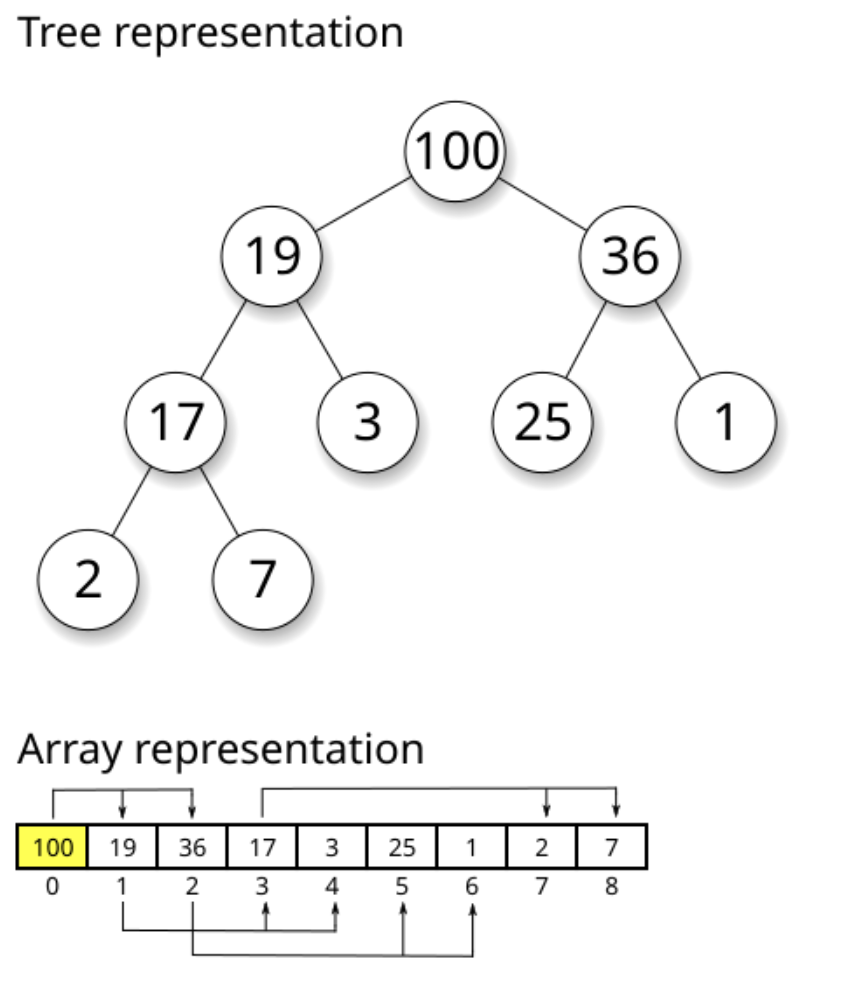
Interactive Heap Operations Demo
Watch Heap Operations in Action! 🎮
See how heaps maintain order with O(log n) insertion and removal!
Min-Heap Visualizer - O(log n) Operations
Code to Demonstrate Heaps?
Heap Property
# Min-heap: Parent ≤ Children
#       1
#      / \
#     3   2
#    / \ / \
#   8  5 7  9

# Root always has minimum value
# Height = log₂(n)
Key Benefits: * Fast access to min/max: O(1) * Fast insertion: O(log n) * Fast removal: O(log n)
Python Heap Example
import heapq  # Python's built-in heap implementation

# Create an empty min-heap
# Min-heap property: parent <= children
heap = []

# Add items - each push is O(log n)
# Heap automatically reorganizes to maintain property
heapq.heappush(heap, 5)
heapq.heappush(heap, 2)
heapq.heappush(heap, 8)
heapq.heappush(heap, 1)

print(heap)  # [1, 2, 8, 5] - partially ordered

# Get and remove minimum - O(log n)
# Heap reorganizes after removal
min_val = heapq.heappop(heap)
print(min_val)  # 1 (smallest element always at top)

# Heap automatically maintains order after each operation!
When to Use Heaps
Important
Perfect Use Cases:
- 🏥 Priority Queues - Process items by importance
- 📊 Finding Top-K Elements - Get k largest/smallest efficiently
- 🎮 Event Scheduling - Handle events in time order
- 🚗 Route Planning - Dijkstra’s shortest path algorithm
- 📈 Streaming Data - Maintain running median/statistics
Trade-off: Not fully sorted, just maintains priority relationship
Part 4: O(2^n) - Exponential Time
The Recursive Monster 💥
O(2^n) means time doubles with each additional element!
Warning: Exponential algorithms become impossible very quickly. Even 50 items can take longer than the age of the universe!
What is O(2^n) - Exponential Time?
The Recursive Explosion 💥
O(2^n) means the algorithm’s time doubles with each additional input!
Real-World Analogy: * Like a chain letter - each person sends to 2 more * Day 1: 1 person, Day 2: 2, Day 3: 4… * Day 30: Over 1 billion people!
Explosive Growth 🚀
- 10 items → 1,024 operations
- 20 items → 1,048,576 operations
- 30 items → 1,073,741,824 operations
- Each +1 item doubles the work!
Key Insight 🔑
Typically uses branching recursion - each call creates multiple recursive calls.
Danger Signal:
“Does my function call itself multiple times?”
If yes → Might be O(2^n)!
Naive Fibonacci - Classic O(2^n)
The Exponential Fibonacci
def fibonacci(n):
    """Naive recursive Fibonacci - O(2^n) exponential time!"""
    # Base case: fib(0) = 0, fib(1) = 1
    if n <= 1:
        return n

    # TWO recursive calls - this creates exponential growth!
    # Each call branches into two more calls
    return fibonacci(n-1) + fibonacci(n-2)

# The explosion:
# fib(5) calls fib(4) and fib(3)
# fib(4) calls fib(3) and fib(2)
# fib(3) is calculated MULTIPLE times! (wasteful redundancy)

print(fibonacci(10))  # Result: 55
# But took ~177 function calls to compute!
# Time complexity: O(2^n) - doubles with each n
Why O(2^n)? * Each call creates 2 more calls * Massive redundant computation * Binary tree of recursion
The O(n) Solution
def fibonacci_fast(n):
    """Iterative Fibonacci - O(n) linear time!"""
    # Base case
    if n <= 1:
        return n

    # Iterative approach: O(n)
    # Only stores two previous values
    prev, curr = 0, 1
    # Build up from fib(2) to fib(n)
    for _ in range(2, n + 1):
        prev, curr = curr, prev + curr  # Simultaneous assignment
    return curr

# OR use memoization (caching)
from functools import lru_cache

@lru_cache(maxsize=None)  # Cache all results
def fib_memo(n):
    """Memoized Fibonacci - O(n) with caching"""
    if n <= 1:
        return n
    # Same recursive structure, but results are cached
    return fib_memo(n-1) + fib_memo(n-2)

# Now each fib(k) computed only once!
print(fibonacci_fast(50))  # Instant! No exponential explosion
Interactive Fibonacci Demo
Watch the Exponential Explosion! 🎮
See how naive Fibonacci creates massive redundant calculations!
Naive Fibonacci - O(2^n) Recursive Explosion
Mini Challenge: Optimization Challenge
Compare O(2^n) vs O(n)! 🧑💻
Challenge: Fibonacci Performance
import time  # For timing execution
from functools import lru_cache  # For memoization decorator

# Naive O(2^n) - exponential time complexity
def fib_slow(n):
    """Naive recursive Fibonacci without caching"""
    if n <= 1:
        return n
    # Each call creates 2 more calls - exponential growth!
    return fib_slow(n-1) + fib_slow(n-2)

# Optimized O(n) with memoization (caching)
@lru_cache(maxsize=None)  # Decorator caches all results
def fib_fast(n):
    """Optimized Fibonacci with memoization"""
    if n <= 1:
        return n
    # Same structure, but cached results prevent recalculation
    return fib_fast(n-1) + fib_fast(n-2)

# Test both approaches with different input sizes
test_values = [10, 15, 20, 25, 30]

print("n\tSlow Time\tFast Time\tSpeedup")
for n in test_values:
    # Time slow version (O(2^n))
    start = time.time()
    result_slow = fib_slow(n)
    slow_time = time.time() - start

    # Time fast version (O(n))
    fib_fast.cache_clear()  # Clear cache for fair comparison
    start = time.time()
    result_fast = fib_fast(n)
    fast_time = time.time() - start

    # Calculate speedup factor
    speedup = slow_time / max(fast_time, 0.000001)  # Avoid division by zero
    print(f"{n}\t{slow_time:.4f}s\t\t{fast_time:.6f}s\t{speedup:.0f}x")

    # Stop if slow version takes too long
    if slow_time > 5:
        print("Stopping - exponential version too slow!")
        break

# YOUR TASK: What patterns do you notice?
# How does the speedup change as n increases?
# Notice: speedup grows exponentially!
Part 5: Travelling Salesman Problem
The Ultimate Optimization Challenge 🗺️
Finding the shortest route through all cities!
What is the Travelling Salesman Problem?
The Ultimate Route Challenge 🗺️
The Problem: Visit every city exactly once and return home using the shortest possible route.
Real-World Applications:
- 🚚 Delivery Services - UPS saves millions optimizing routes
- 🏭 Circuit Board Manufacturing - Drilling holes efficiently
- 🧬 DNA Sequencing - Optimal gene arrangements
- 🚌 School Bus Routes - Getting kids to school faster
Why It Matters 🚚
- Amazon saves fuel and time
- Manufacturing saves money
- Everyone gets faster service
- Reduces carbon emissions
The Challenge ⚡
- 3-4 cities: Easy
- 10 cities: 3,628,800 routes!
- 20 cities: More routes than atoms in universe!
- Optimal solution: O(n!) factorial time
Key Question: How do we find good routes without checking every possibility?
TSP Complexity: The Factorial Explosion
Important
For n cities, there are (n-1)!/2 unique routes
Why? Fix starting city, divide by 2 (clockwise/counterclockwise are same).
The Numbers
import math  # For factorial calculation

def tsp_routes(n):
    """Calculate number of unique TSP routes for n cities"""
    if n <= 1:
        return 0
    # Formula: (n-1)! / 2
    # Fix start city, divide by 2 (clockwise = counterclockwise)
    return math.factorial(n-1) // 2

# Watch the factorial explosion!
for n in range(3, 11):
    routes = tsp_routes(n)
    print(f"{n} cities: {routes:,} routes")
    # Notice: each additional city multiplies routes dramatically!
Results:
- 3 cities → 1 route, 5 cities → 12 routes
- 10 cities → 181,440 routes, 15 cities → 43,589,145,600 routes!
Time to Check All Routes
Assuming 1 microsecond per route:
- 10 cities: 0.18 seconds ✓
- 15 cities: 12 hours ⚠️
- 20 cities: 77 years 🛑
- 25 cities: 490 billion years! 💀
Reality: Need smart approximations, not exhaustive search!
Interactive TSP Demo
Plan Your Route! 🎮
Click on the map to add cities, then find the best route!
🗺️ Interactive Travelling Salesman Demo
Mini Challenge: TSP Approximations
Smart Route Planning! 🧑💻
Challenge: Nearest Neighbor Heuristic
import random  # For generating random city positions
import math    # For distance calculations

# Generate random cities in a 100x100 grid
def generate_cities(n):
    """Create n cities with random (x, y) coordinates"""
    return [(random.randint(0, 100),
             random.randint(0, 100))
            for _ in range(n)]

# Calculate Euclidean distance between two cities
def distance(city1, city2):
    """Calculate straight-line distance between cities"""
    x1, y1 = city1
    x2, y2 = city2
    # Pythagorean theorem: sqrt((x2-x1)^2 + (y2-y1)^2)
    return math.sqrt((x2-x1)**2 + (y2-y1)**2)

# Nearest neighbor heuristic - O(n²) approximation algorithm
def nearest_neighbor(cities):
    """Greedy TSP approximation: always visit nearest unvisited city"""
    unvisited = cities.copy()  # Copy to avoid modifying original
    route = [unvisited.pop(0)]  # Start at first city

    # Continue until all cities visited
    while unvisited:
        current = route[-1]  # Current city is last in route
        # Find nearest unvisited city using min() with key function
        nearest = min(unvisited,
                      key=lambda c: distance(current, c))
        route.append(nearest)  # Add to route
        unvisited.remove(nearest)  # Mark as visited

    # Return to start city to complete the tour
    route.append(route[0])
    return route

# Calculate total distance of a route
def route_distance(route):
    """Sum distances between consecutive cities in route"""
    total = 0
    # Add distance between each pair of consecutive cities
    for i in range(len(route) - 1):
        total += distance(route[i], route[i+1])
    return total

# Test it!
cities = generate_cities(10)  # Create 10 random cities
route = nearest_neighbor(cities)  # Find approximate route
dist = route_distance(route)  # Calculate total distance

print(f"Route distance: {dist:.2f}")
print("Route:", route)

# Not optimal, but fast O(n²) and reasonably good!
# Avoids O(n!) brute force - practical for real-world use
Complexity Comparison Summary
Choosing the Right Algorithm
| Complexity | Name | Example | 10 items | 1000 items | When to Use |
|---|---|---|---|---|---|
| O(1) | Constant | Dict lookup | 1 step | 1 step | Direct access possible |
| O(log n) | Logarithmic | Binary search | 3 steps | 10 steps | Data is sorted |
| O(n) | Linear | Simple search | 10 steps | 1000 steps | Must check each item |
| O(n log n) | Log-linear | Merge sort | 33 steps | 10,000 steps | Good general sorting |
| O(n²) | Quadratic | Bubble sort | 100 steps | 1,000,000 steps | Small datasets only |
| O(2^n) | Exponential | Naive Fibonacci | 1024 steps | Impossible | Avoid if possible! |
| O(n!) | Factorial | TSP (brute force) | 3.6M steps | Impossible | Need approximations |
Key Takeaways
Important
What We Learned Today:
- ⚡ O(1) - Hash tables give instant access regardless of data size
- 🔍 O(log n) - Binary search and heaps scale beautifully through divide-and-conquer
- 🏥 Heaps - Maintain priority order with O(log n) operations
- 💥 O(2^n) - Exponential algorithms become impossible quickly - use memoization!
- 🗺️ TSP - Real-world problems often require smart approximations, not perfect solutions
- 📊 Trade-offs - Choose algorithms based on data size, structure, and requirements
Tip
The Big Picture: Understanding complexity helps you write efficient code that scales. Small algorithmic choices make huge differences in real-world performance!
Next Steps & Practice
Note
To Continue Learning About Complexity 🤔:
- 📚 Study more sorting algorithms (merge sort, quick sort, heap sort)
- 🔬 Analyze algorithms in your own code
- 💻 Practice on coding platforms (LeetCode, HackerRank)
- 🎯 Learn about dynamic programming (turns O(2^n) → O(n))
- 🚀 Explore graph algorithms (Dijkstra, A*, etc.)
Remember: The best algorithm depends on your specific problem, data size, and constraints. There’s no one-size-fits-all solution!